Modules: ABAP / SD / WM
Hi Guys, sometimes clients need to build a program to create a TO by multiple DOs. Yes, there is a standard program. We can group the deliveries by VG01 and create the TO using LT0S. And how we achieve it automated by the program. Check it out!
A FEW CONFIGURATIONS
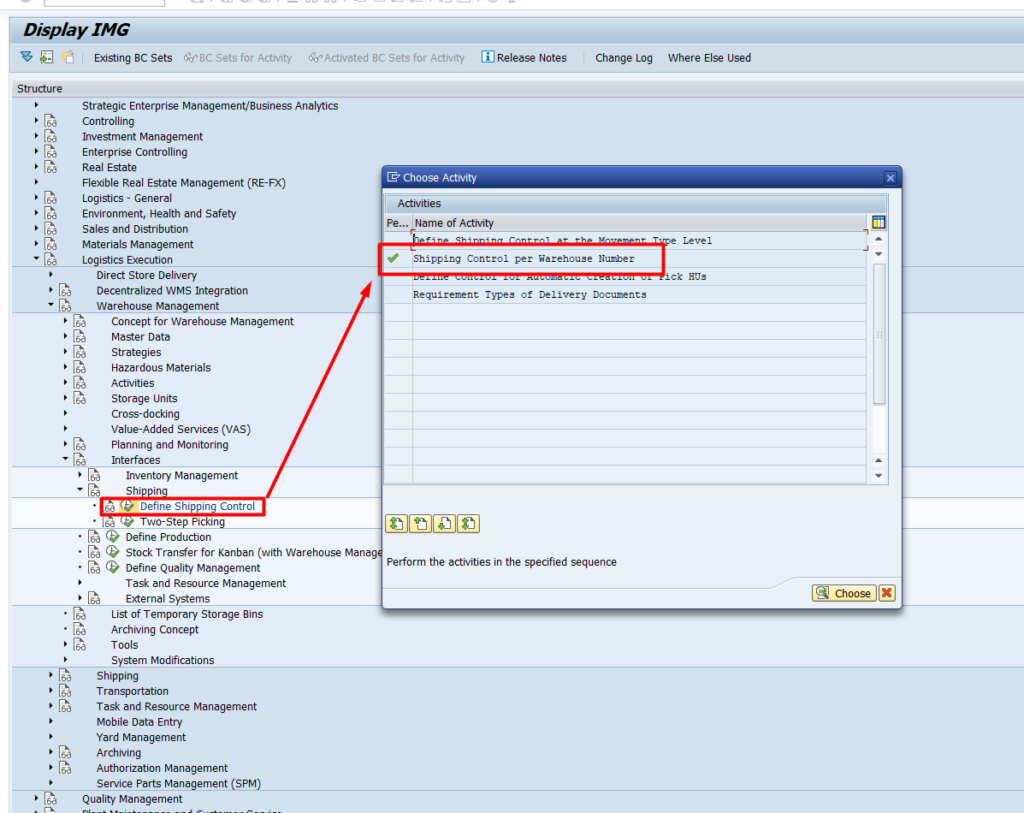
Set Delay Update
go to SPRO and find the path like below. Or you can read the documentation here https://help.sap.com/docs/SAP_S4HANA_ON-PREMISE/b2dee5e83e2446149294f9860a7c08f0/ef8dc95360267214e10000000a174cb4.html
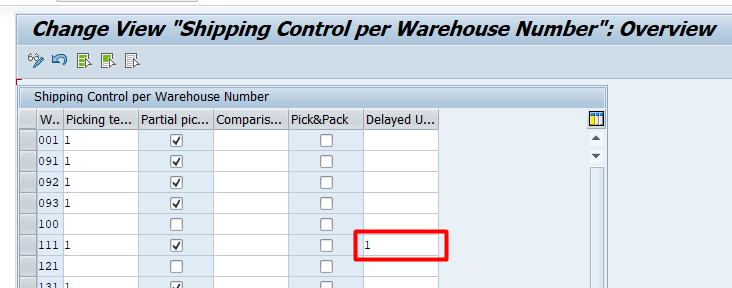
Just simply add ‘1’ to the column like the picture below on the warehouse that you need implement.
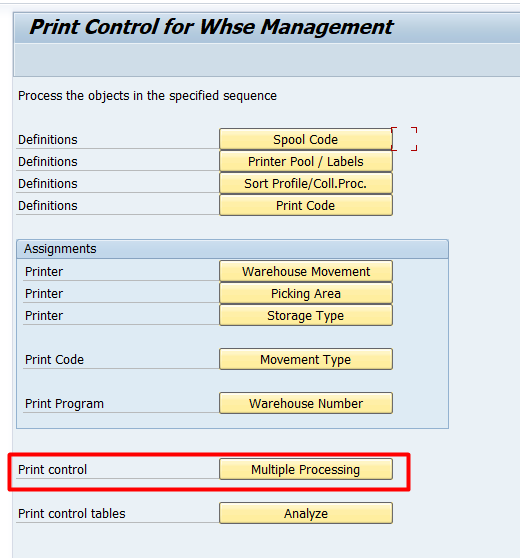
OMLV
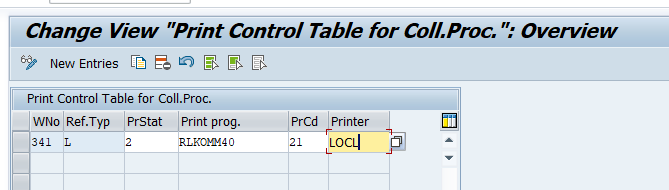
Make sure you config it the right way based on warehouse number.
ABAP
Grouping Orders
  DATA: t_worktab    TYPE TABLE OF lipov,
        i_refnum_add TYPE c,
        i_lgnum      LIKE likp-lgnum,
        i_vtext      LIKE vbsk-vtext,
        i_smart      LIKE vbsk-smart,
        i_cdsto      LIKE t311-cdsto,
        e_vbsk       TYPE vbsk,
        ls_worktab   TYPE lipov.


    LOOP AT t_data INTO DATA(ls_data).
      ls_worktab-vbeln = ls_data-vbeln.
      ls_worktab-posnr = ls_data-posnr.
      APPEND ls_worktab TO t_worktab.
    ENDLOOP.


    i_refnum_add = 'X'.
    i_lgnum = warehouse_number.
    i_vtext = 'Collective TO'.
    i_smart = 'K'.
    i_cdsto = 'X'.
    CALL FUNCTION 'WS_LM_GROUP_CREATE'
      EXPORTING
        if_refnum_add            = i_refnum_add
        if_lgnum                 = i_lgnum
        if_vtext                 = i_vtext
        if_smart                 = i_smart
        if_cdsto                 = i_cdsto
      IMPORTING
        es_vbsk                  = e_vbsk
      TABLES
        ct_worktab               = t_worktab
      EXCEPTIONS
        no_pick_wave_permission  = 1
        no_pick_wave_possible    = 2
        refnum_assigned          = 3
        refnum_assigned_all      = 4
        locking_error            = 5
        no_pick_wave_created     = 6
        no_group_number_assigned = 7
        group_already_existing   = 8
        no_wm_group_created      = 9
        no_group_posted          = 10
        no_output_found          = 11
        no_output_posted         = 12
        wrong_group_type         = 13
        warehouse_number_missing = 14
        no_deliveries_selected   = 15
        wrong_warehouse_number   = 16
        wrong_document_type      = 17
        later_not_aktive         = 18
        no_spanning_to_possible  = 19
        OTHERS                   = 20.

    IF sy-subrc = 0.
      result_group_number = e_vbsk-sammg.
    ENDIF.
Create TO by Group
    DATA: t_vbeln      TYPE TABLE OF vbeln_tab.

    i_refnr = result_group_number. " Group Code
    i_teilk = 'X'.

    DELETE ADJACENT DUPLICATES FROM t_data COMPARING vbeln.
    LOOP AT t_data INTO ls_data.
      ls_vbeln-vbeln = ls_data-vbeln.
      APPEND ls_vbeln TO t_vbeln.
    ENDLOOP.

    i_lgnum = ls_data-lgnum.

    CALL FUNCTION 'L_TO_CREATE_DN_MULTIPLE'
      EXPORTING
        i_lgnum               = i_lgnum
        i_refnr               = i_refnr
        i_teilk               = i_teilk
      TABLES
        it_vbeln              = t_vbeln " you can choose which deliveries that you want to proceed here
        et_ltak               = et_ltak
        et_ltap               = et_ltap
        et_wmgrp_msg          = et_msg
      EXCEPTIONS
        foreign_lock          = 1
        xfeld_wrong           = 2
        ldest_wrong           = 3
        drukz_wrong           = 4
        delivery_not_found    = 5
        no_to_created         = 6
        teilk_wronk           = 7
        update_without_commit = 8
        no_authority          = 9
        input_wrong           = 10
        later_not_active      = 11
        OTHERS                = 12.

    IF sy-subrc = 0.
        TO_Number = ls_ltak-tanum.
    ENDIF.