Today I will share my techniques on how to consume file .txt from my experience
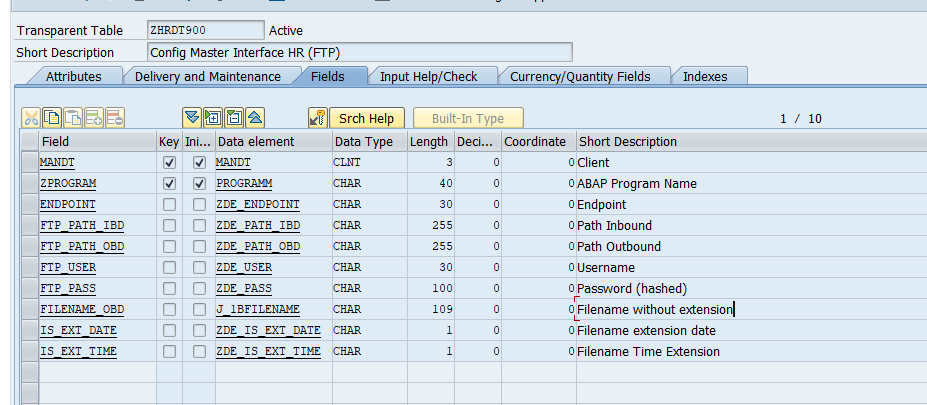
Maintenance Table of Interface Config Master is designed like this

Password is prohibited to input via SM30 screen. They are input via Zprogram because it has to be encrypted to make your password secure.
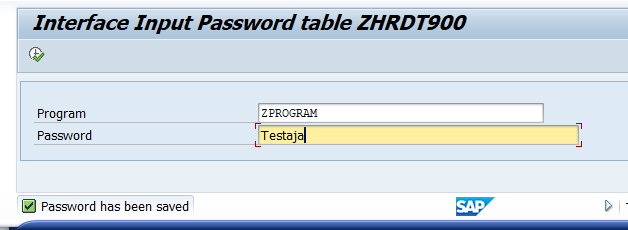
Here is how I encode & decode my password (CLICK)
Here we go to the our FTP Interface Program
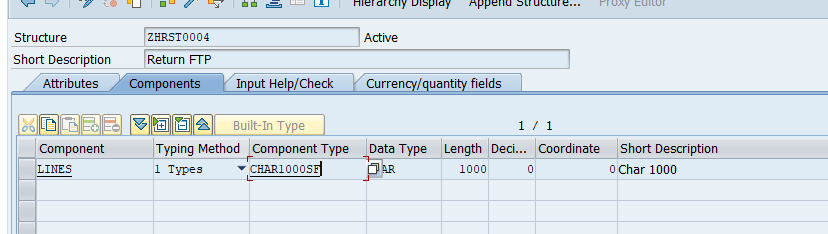
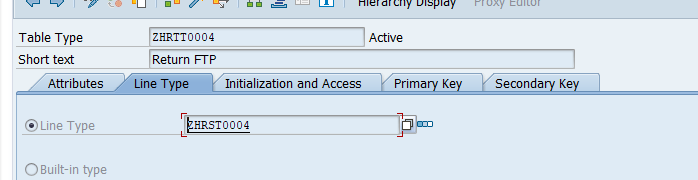
STRUCTURE
I will use char with length 1000 to read the content and command
METHODS
I have several methods that will reuse in our programs
  METHOD do_command.

    DATA: lv_command TYPE char1000sf.
    lv_command = im_command.

    CALL FUNCTION 'FTP_COMMAND'
      EXPORTING
        handle        = m_handle
        command       = lv_command
      TABLES
        data          = ex_t_result[]
      EXCEPTIONS
        tcpip_error   = 1
        command_error = 2
        data_error    = 3
        OTHERS        = 4.
    IF sy-subrc <> 0.
* Implement suitable error handling here
    ENDIF.

  ENDMETHOD.
METHOD r3_to_server.
DATA: lv_filename TYPE char1000sf.
lv_filename = im_filename.
CALL FUNCTION 'FTP_R3_TO_SERVER'
EXPORTING
handle = m_handle
fname = lv_filename
* BLOB_LENGTH =
character_mode = 'X'
TABLES
* BLOB =
text = im_t_content
EXCEPTIONS
tcpip_error = 1
command_error = 2
data_error = 3
OTHERS = 4.
IF sy-subrc <> 0.
* Implement suitable error handling here
ENDIF.
ENDMETHOD.And here is the main program
- Get master config
    SELECT SINGLE *
      FROM zhrdt900
      INTO ms_config
      WHERE zprogram EQ im_program.
2. Open FTP
    DATA: lv_key       TYPE i VALUE 26101957,
          lv_slen      TYPE i,
          lv_hash_pass TYPE char30,
          lv_pass_enc  TYPE string,
          lv_pass_dec  TYPE string,
          lv_pass      TYPE char30.

    lv_pass_enc = ms_config-ftp_pass.

    CALL FUNCTION 'ZFM_DECODE_BASE64'
      EXPORTING
        im_enc_string = lv_pass_enc
      IMPORTING
        ex_dec_string = lv_pass_dec.

    lv_pass = lv_pass_dec.

    lv_slen = strlen( lv_pass ).
    CALL FUNCTION 'HTTP_SCRAMBLE'
      EXPORTING
        source      = lv_pass
        sourcelen   = lv_slen
        key         = lv_key
      IMPORTING
        destination = lv_hash_pass.

    CALL FUNCTION 'FTP_CONNECT'
      EXPORTING
        user            = ms_config-ftp_user
        password        = lv_hash_pass
        host            = ms_config-endpoint
        rfc_destination = 'SAPFTPA'
      IMPORTING
        handle          = m_handle
      EXCEPTIONS
        not_connected   = 1
        OTHERS          = 2.
    IF sy-subrc <> 0.
      ex_error = 'X'.
    ENDIF.
3. Get List of Filename
    DATA: lt_result  TYPE zhrtt0004,
          lv_command TYPE string.

    lv_command = `cd ` && ms_config-ftp_path_ibd.
    do_command( lv_command ).

    do_command( EXPORTING im_command =  'nlist' IMPORTING ex_t_result = lt_result ).
    LOOP AT lt_result INTO DATA(ls_result).
      FIND '.txt' IN ls_result-lines.
      IF sy-subrc NE 0.
        CONTINUE.
      ELSE.
        APPEND ls_result-lines TO ex_t_file.
      ENDIF.
    ENDLOOP.
4. Get Content
    DATA: lv_fullpath TYPE string,
          lv_command  TYPE string.

    lv_command = `cd ` && ms_config-ftp_path_ibd.
    do_command( lv_command ).

    ex_t_file = server_to_r3( im_filename = im_filename ).
5. Fill Content to Internal Table
TYPES: BEGIN OF gty_data_file,
         field1(8)  TYPE c,
         field2(10) TYPE c,
         field3(4)  TYPE c,
       END OF gty_data_file,
       gtt_data_file TYPE STANDARD TABLE OF gty_data_file WITH EMPTY KEY.

TYPES: BEGIN OF gty_data,
         icon     TYPE icon_d,
         field_alpha   TYPE zdt_log-field_alpha,
         field_date    TYPE zdt_log-field_date,
         field_regular TYPE zdt_log-field_regular,
         message  TYPE zdt_log-message,
         erdat    TYPE zdt_log-erdat,
         erzet    TYPE zdt_log-erzet,
         ernam    TYPE zdt_log-ernam,
         filename TYPE zdt_log-filename,
       END OF gty_data,
       gtt_data TYPE STANDARD TABLE OF gty_data WITH EMPTY KEY.

    DATA:
      ls_ibd TYPE gty_data_file,
      lt_ibd TYPE gtt_data_file.

    LOOP AT im_t_content INTO DATA(ls_content).
      CLEAR: ls_ibd.
      SPLIT ls_content-lines AT gc_tab INTO ls_ibd-field1 ls_ibd-field2 ls_ibd-field3.
      APPEND ls_ibd TO lt_ibd.
    ENDLOOP.

    rt_data = VALUE #( FOR w IN lt_ibd (
      field_alpha = |{ w-field1 ALPHA = IN }|
      field_date = |{ w-field2+6(4) }{ w-field2+3(2) }{ w-field2+0(2) }|
      field_regular = w-field3
    ) ).
6. Process your data and after that save to the log table
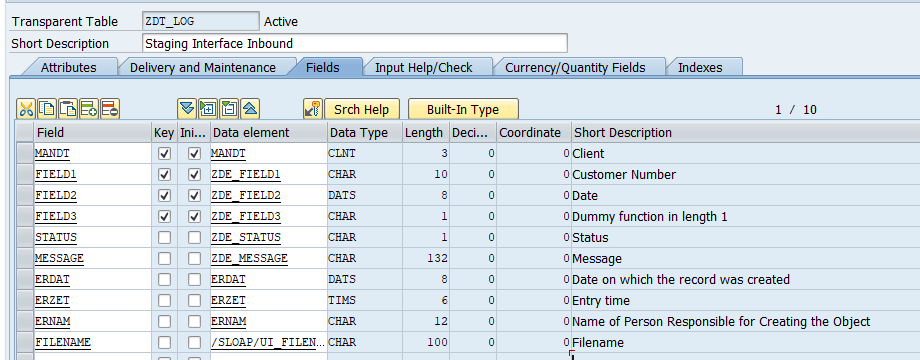
Here is my log table
7. Close the FTP Connection
  METHOD close_ftp.
    CALL FUNCTION 'FTP_DISCONNECT'
      EXPORTING
        handle = m_handle.

    CALL FUNCTION 'RFC_CONNECTION_CLOSE'
      EXPORTING
        destination = im_rfcdest
      EXCEPTIONS
        OTHERS      = 1.
  ENDMETHOD.
That’s it. Simple. I hope you can do it better. 🙂